
sfmapper
Stop being captive to your own CRM.
A few years, a few admins, and a consultant or two later, the only real map of your CRM is in somebody else's head. sfmapper reads how your CRM is built, and hands that map back to you: in plain English, with an analyst you can ask about it.
It reads the structure, never the records.
Where it came from
sfmapper started on a sales call about something else entirely. The client mentioned, in passing, that nobody in the business really knew how their CRM worked, and that it would be a key integration point for what we were building for them.
We took that away, and a week later they had a tool that documented their whole system. Most of what we've built, we built for ourselves. This one, we built because so many organisations are in the same position.
The Salesforce Mapping tool is exactly what we needed. After many years of customisations on customisations, we'd completely lost track of how our system was set up, making every change expensive and risky. With absolutely no IT knowledge, I was able to map our Salesforce environment and can now make real, informed decisions about the changes we want to implement.
Seven CRMs, in their own words
Whichever CRM you're on, the scan uses its own vocabulary: a HubSpot portal reads like HubSpot, and a Dynamics environment like Dynamics. Where a CRM doesn't share something, the scan says so plainly, rather than showing it as empty.
What's in a scan
- Objects and fields, standard and custom, and how they relate
- How many records you have, and which fields anyone fills in
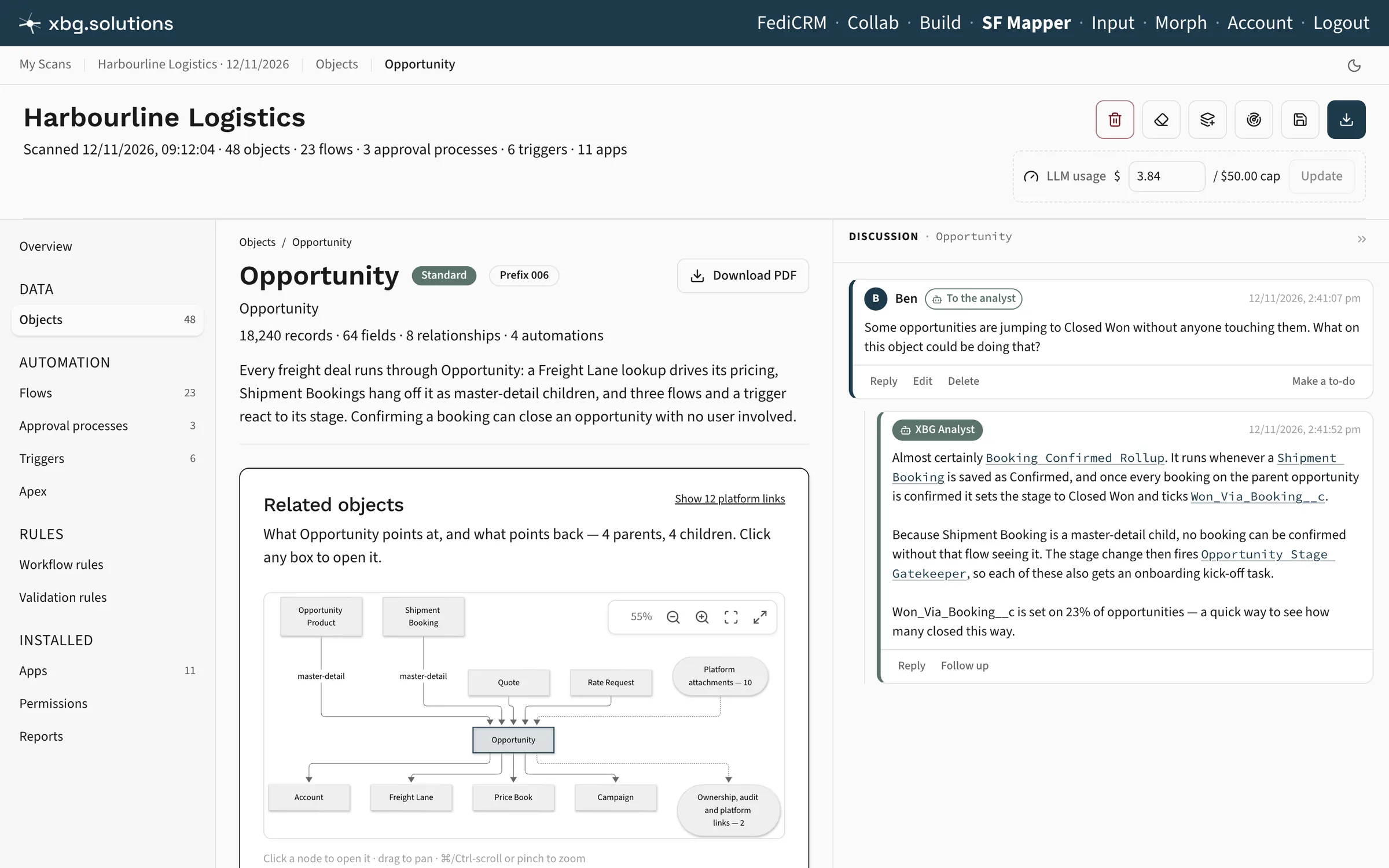
- Automations, code, rules, and approvals, each linked to what it touches
- Every app and package you've installed, and what each one added
- Permissions and reports, if you'd like them
How it works
Connect your CRM and say yes. The scan runs in the background and tells you when it's done. Run it again whenever things change: every scan is kept.
An exact answer, not a best guess
"What happens when someone saves a deal?" Click any object, and see every automation, script, and approval that touches it. The list comes from the automations' own definitions, so it isn't guesswork.
The overview nobody had time to write
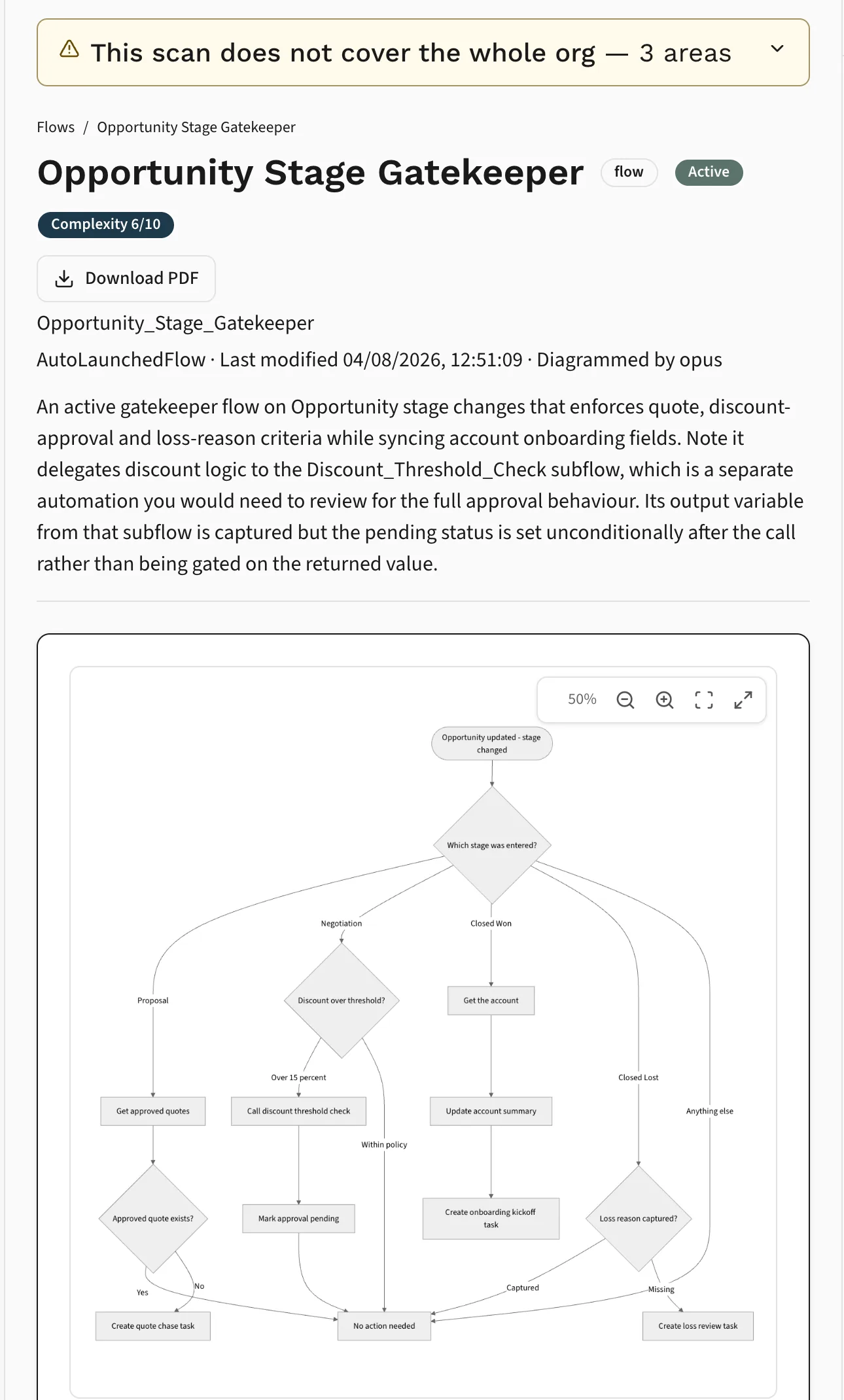
A diagram and a plain-English summary for every automation, then a few paragraphs on the whole thing: what your CRM is mainly for, what's been bolted on, and where the complexity lives.
Ask from any page
"Which of these could we switch off?" The analyst looks things up in your scan before it answers, links to everything it names, and says when the scan couldn't see something. It can draft a change, for someone to make.
The facts come from your CRM
Every object, field, relationship, and app, the record counts, and which automations touch which objects are read straight from your CRM. Scan the same CRM twice and you get the same list. That's the part you can hold anyone to.
The AI just explains them
AI is good at explaining, and not so good at admitting what it doesn't know. So it never gets to decide what's in your CRM. It explains what the scan found, it can only link what the scan found, and every diagram is checked before you see it. A spending cap on each scan means a big CRM can't run up a big bill.
Compare two scans
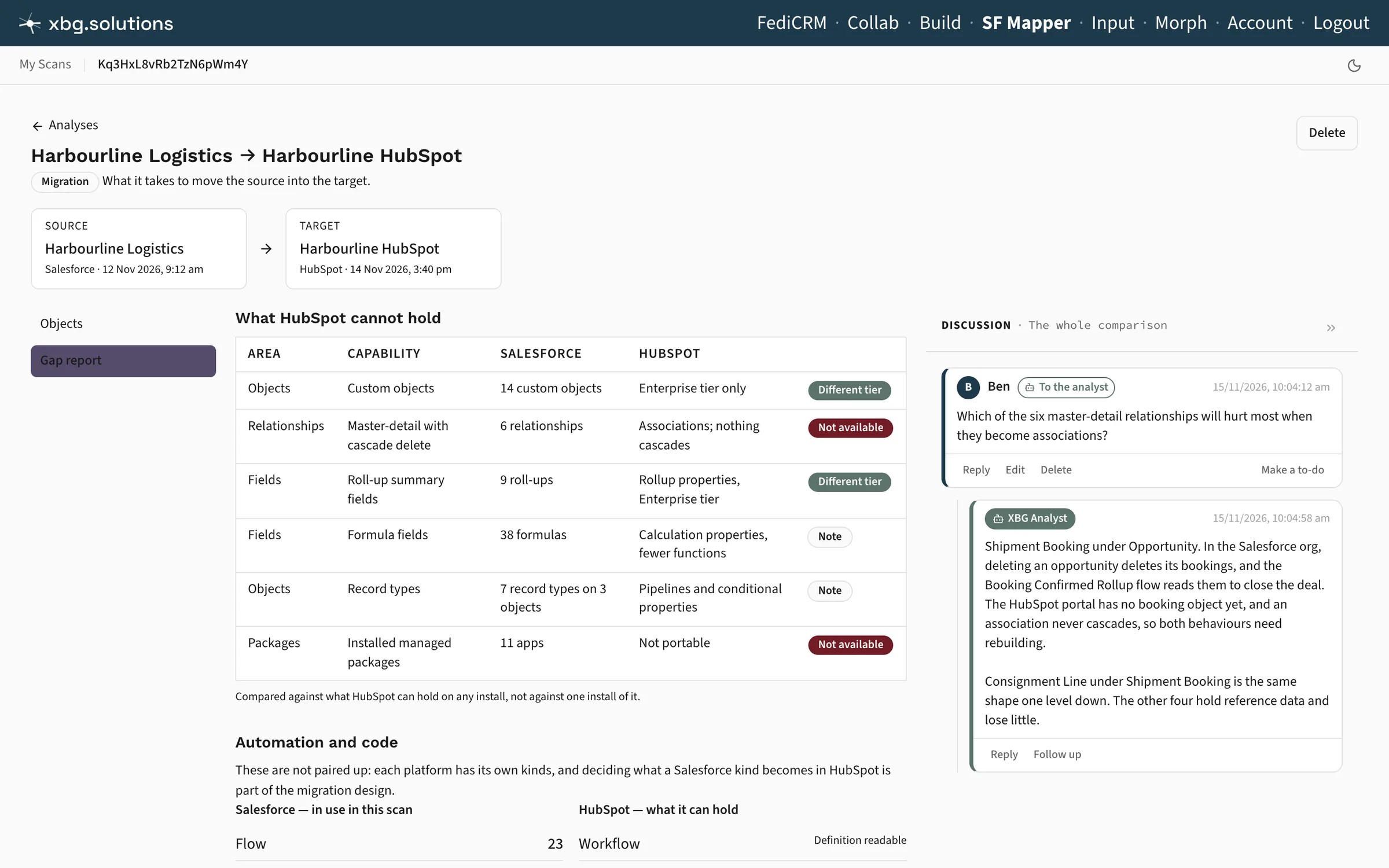
Link two scans into a comparison, and get an analysis of what's different, then talk it through with an analyst that has both scans in front of it. One scan can belong to as many comparisons as you need.
How it's changed
Compare two scans of the same CRM, months apart, and see what's been added, changed, and left behind. Or compare two CRMs that should match, and find where they've drifted.
Where it has to go
Moving to a new CRM? Mark one scan as the source and the other as the target, and the comparison is about the migration: what the source does, and what the target has to account for.
Structure, not records
No customer, contact, or deal ever leaves your CRM. The only questions sfmapper can ask of your data are "how many?": how many records, and how full each field is.
One honest caveat: some CRMs, Salesforce among them, don't offer read-only access, so the connection you approve could technically make changes. Nothing here does, and the connection is deleted the moment the scan finishes, whether it worked or not. Where your CRM lets us, we revoke it too.
Keep it, or keep nothing
By default, the scan is kept for the workspace, the analyst, and comparisons, encrypted under a key held for your account. Or choose scan only: you get the file, and we delete everything else within the hour.
We design sfmapper, and the platform under it, for SOC 2 and GDPR readiness.
For CRM consultants: bring your clients
If you're the admin or developer your clients call, invite them in. They sign up linked to you, and you see every scan they keep, join their threads, and ask the analyst right alongside them. No more working from screenshots.
Earn while they stay
You earn a share of every payment your clients make, for as long as they stay, with no cap. Your clients stay in control: they can remove you whenever they like.
Get your CRM back
Sign up, connect your CRM, and run your first scan. You'll be reading it the same day.
Often goes with
A CRM is usually one of the systems everything else connects to. Working out how it fits with the rest is Solutions Architecture.
Ready for a conversation?
No sales pitch. No obligation. Just a chat about what you're building and where the opportunities might be.